
On this page
- What Is Beacon Technology?
- Beacon Technology Is About Context, Not Exact Location
- How a Beacon-Based Mobile App Works
- Common Use Cases for Beacon-Based Mobile Apps
- Retail
- Indoor Navigation
- Healthcare
- Logistics and Warehousing
- Events and Museums
- Smart Offices
- Beacon Identity: Design This Before Writing the App
- Step-by-Step: Integrating Beacon Technology Into a Mobile App
- Start With the Business Event
- Select the Beacon Hardware
- Create a Beacon Registry
- Build a Mobile Beacon Abstraction
- Handle Android Permissions Correctly
- Handle iOS Beacon Access
- Request Only the Permissions You Actually Need
- Separate Monitoring From Ranging
- Don’t Turn Every BLE Observation Into an Event
- Send Meaningful Events to the Backend
- Production Beacon Architecture
- Beacon Technology and Backend Design
- Beacon Technology vs GPS
- Can Beacons Provide Indoor Navigation?
- Background Processing: Design for the OS, Not Against It
- Battery Optimization
- Privacy and Security
- Common Beacon Integration Mistakes
- Treating RSSI as exact distance
- Sending every scan to the backend
- Hard-coding physical locations
- Requesting every permission at startup
- Copying old iOS tutorials
- Assuming Android and iOS behave identically
- Testing only in the office
- Building the entire system before validating the signal
- When Should You Use Beacon Technology?
- Can Flutter Be Used for Beacon App Development?
- When Should You Build a Beacon PoC First?
- Production Readiness Checklist
- Frequently Asked Questions
- What is beacon technology in mobile app development?
- How does a mobile app detect a beacon?
- Is beacon technology the same as GPS?
- Can a beacon provide exact distance?
- Does Android require location permission for beacons?
- Does iOS require location permission for beacon applications?
- Can beacon detection work in the background?
- Can Flutter integrate beacon technology?
- Do I need a backend for a beacon app?
- Are beacons suitable for indoor navigation?
- How Ethereal Softech Can Help
A mobile app can know more about its surroundings than just the user’s GPS location.
With Bluetooth Low Energy (BLE) beacons, an application can detect that a device is near a particular physical area, object, or zone and use that context to trigger an appropriate action.
For example, a retail application could recognize that a customer has entered a particular department. A hospital application could associate a workflow with a specific area. A museum app could display information when a visitor approaches an exhibit. A warehouse application could use beacon events as part of an asset or operational workflow.
But there is an important engineering distinction:
A beacon does not provide a complete location system by itself. It provides a signal that an application can interpret as proximity or physical context.
A reliable production implementation therefore needs more than Bluetooth scanning. It needs a well-defined beacon identity model, platform-specific mobile integration, permission handling, event filtering, business rules, backend architecture, privacy controls, and real-world testing.
This guide explains how to approach beacon technology in mobile app development from an engineering and product perspective.
What Is Beacon Technology?
A beacon is a small device that broadcasts information using Bluetooth Low Energy (BLE).
A compatible smartphone can detect the broadcast and identify the beacon based on the information contained in its advertisement.
The application can then associate that beacon with something meaningful in the physical environment.
For example:
Beacon
   ↓
Beacon ID
   ↓
Building A
   ↓
Floor 2
   ↓
Cardiology Department
   ↓
Application Context
The beacon itself does not need to contain the complete business information.
A better architecture is usually to keep the physical identity small and resolve its meaning through application configuration or a backend.
This means that if a beacon moves from one room to another, the business mapping can potentially be changed without rebuilding the mobile application.
Beacon Technology Is About Context, Not Exact Location
This is one of the most important concepts when designing a beacon-based application.
A beacon signal can help an application determine that a device is near something.
It should not automatically be interpreted as:
“The user is exactly 4.2 meters from the beacon.”
BLE signal strength can change because of walls, people, furniture, device orientation, antenna characteristics, transmission power, and other environmental conditions.
Apple describes iBeacon ranging as determining relative proximity, rather than providing a guaranteed precise distance.
So a better product model is:
Beacon detected
      ↓
Proximity / context
      ↓
Business decision
rather than:
Beacon detected
      ↓
Exact GPS-like coordinates
If a project requires precise indoor positioning, additional technologies, calibration, mapping, or sensor fusion may be required.
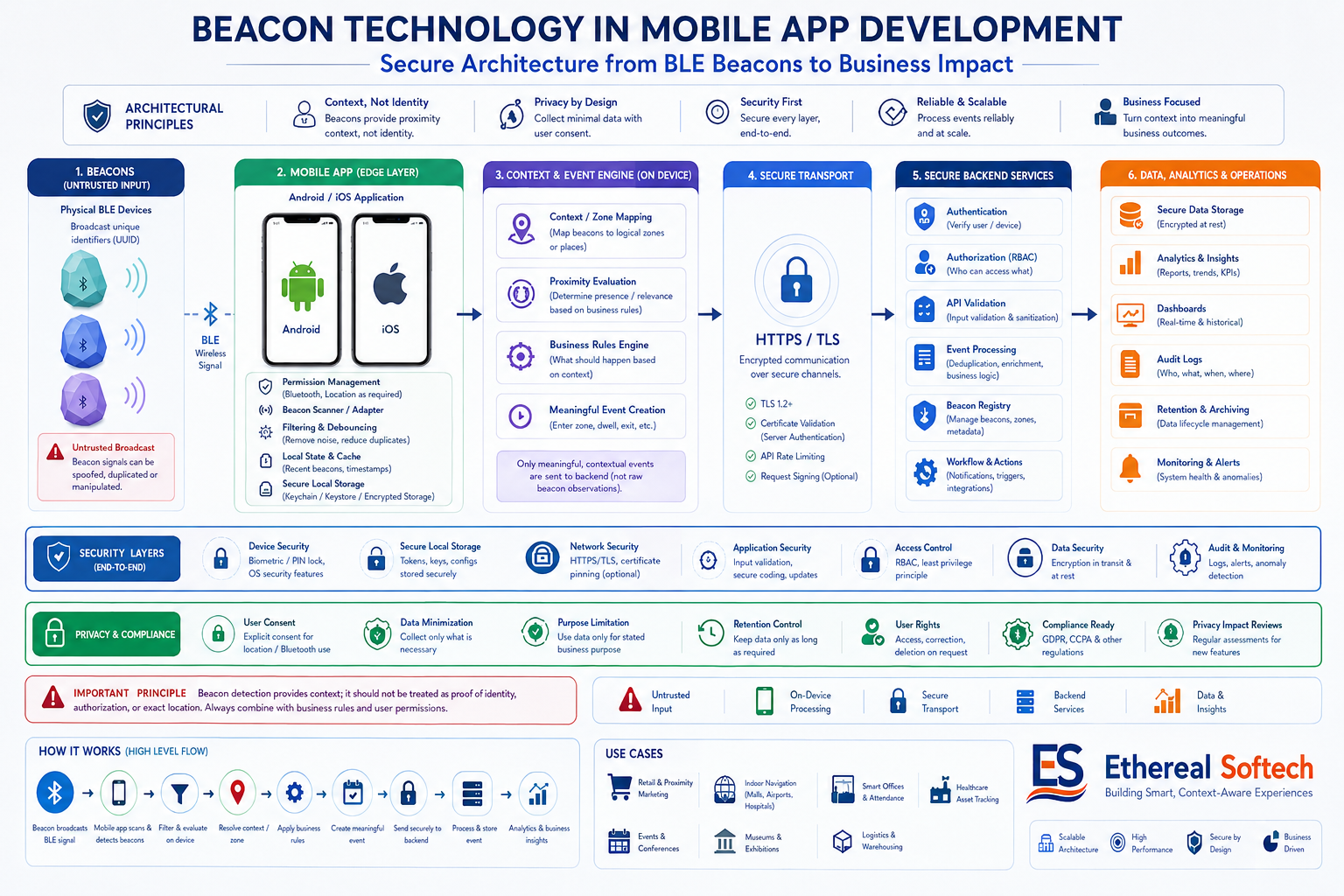
How a Beacon-Based Mobile App Works
A production architecture can be divided into several layers:
┌─────────────────────────────┐
│       Physical Beacon       │
│        BLE Broadcast        │
└──────────────┬──────────────┘
               ↓
┌─────────────────────────────┐
│     Mobile Beacon Layer     │
│       Android / iOS         │
└──────────────┬──────────────┘
               ↓
┌─────────────────────────────┐
│     Beacon Identity         │
│ UUID / Major / Minor / ID   │
└──────────────┬──────────────┘
               ↓
┌─────────────────────────────┐
│    Context Resolution       │
│ Building / Floor / Zone     │
└──────────────┬──────────────┘
               ↓
┌─────────────────────────────┐
│      Business Rules         │
│ What should the app do?     │
└──────────────┬──────────────┘
               ↓
┌─────────────────────────────┐
│       User Experience       │
│ Screen / Alert / Workflow   │
└──────────────┬──────────────┘
               ↓
┌─────────────────────────────┐
│       Backend Events        │
│ Analytics / Operations      │
└─────────────────────────────┘
This separation is important.
Beacon detection should not directly become business logic.
Instead:
Signal → identity → context → business rule → action
That architecture makes the system easier to test, maintain, and extend.
Common Use Cases for Beacon-Based Mobile Apps
Beacon technology is most useful when the physical environment needs to become part of the application’s context.
Retail
A store can associate beacons with departments or zones.
For example:
Beacon A → Electronics
Beacon B → Fashion
Beacon C → Checkout
The application could then display relevant content when the customer enters an appropriate area.
The important point is that the beacon should trigger a business event, not blindly send promotional notifications every time it is detected.
Indoor Navigation
GPS is generally not the preferred technology for indoor proximity.
Beacons can help identify zones within:
Hospitals, airports, malls, campuses, museums, offices, and large facilities.
However, a full indoor navigation system may require more than beacons.
Depending on the required accuracy, the architecture could combine:
BLE, maps, inertial sensors, Wi-Fi positioning, visual positioning, or other positioning technologies.
Therefore, evaluate the required accuracy before deciding that beacons alone are sufficient.
Healthcare
Beacon technology can support physical-context workflows around:
Rooms, equipment, departments, staff workflows, and operational zones.
For example, a hospital application might associate a detected beacon with a department or room context and present the appropriate workflow.
Healthcare projects require additional attention to privacy, authorization, data retention, and access control.
Logistics and Warehousing
Beacons can help associate assets or operational workflows with physical zones.
For example:
Asset
  ↓
Beacon / Zone
  ↓
Warehouse Area
  ↓
Business Event
  ↓
Backend
This can support inventory workflows, equipment management, movement events, and operational analytics.
Events and Museums
An application can associate a physical area with content.
For example:
Visitor approaches Exhibit 12 → application identifies Exhibit 12 → relevant content becomes available.
This is a much cleaner use case for beacon technology than trying to continuously calculate exact coordinates.
Smart Offices
Beacons can provide context for:
Meeting rooms, office zones, employee workflows, equipment, visitor experiences, and facility management.
The application can use proximity as one input into a larger business rule.
Beacon Identity: Design This Before Writing the App
For iBeacon deployments, UUID, major, and minor values can be used to identify beacon groups and individual beacons. Apple’s current documentation still describes these identity characteristics, although older CLBeaconRegion APIs are now deprecated in favor of newer condition-based APIs.
A practical hierarchy might look like:
UUID
 └── Organization
      │
      ├── Major
      │    └── Building
      │
      └── Minor
           └── Zone / Beacon
For example:
UUID:  A1B2C3D4-E5F6-1234-5678-90ABCDEF1234
Major: 100
Minor: 1
The exact mapping is a product decision.
For a large deployment, don’t hard-code:
Minor 1 = Room A
Minor 2 = Room B
Minor 3 = Room C
throughout the application.
Instead, consider maintaining a backend mapping:
Beacon ID
    ↓
Location
    ↓
Zone
    ↓
Business Rules
This gives operations teams more flexibility when physical infrastructure changes.
Step-by-Step: Integrating Beacon Technology Into a Mobile App
Start With the Business Event
Before selecting hardware or an SDK, answer:
What should happen when this beacon is detected?
For example:
Employee enters warehouse
        ↓
Beacon detected
        ↓
Zone identified
        ↓
Attendance workflow evaluated
        ↓
Arrival event recorded
Or:
Visitor approaches exhibit
        ↓
Beacon detected
        ↓
Exhibit identified
        ↓
Content loaded
This prevents the project from becoming nothing more than a BLE scanner.
Select the Beacon Hardware
Hardware selection should consider:
BLE support, transmission power, battery life, physical environment, mounting options, configuration, remote management, firmware capabilities, deployment scale, and replacement strategy.
Don’t select a beacon simply because its advertised range is larger.
Real-world performance depends heavily on the deployment environment.
Before purchasing hundreds of devices, test a representative sample in the actual environment.
Create a Beacon Registry
For a serious deployment, create a central registry.
For example:
Beacon ID
UUID
Major
Minor
Building
Floor
Zone
Status
Battery
Last Seen
Installation Date
This becomes the operational source of truth.
It also makes it easier to replace a physical beacon without changing application logic.
Build a Mobile Beacon Abstraction
A strong cross-platform architecture should separate the product layer from platform-specific Bluetooth implementation.
For example:
                    Mobile Application
                           │
                           ▼
                  Beacon Service Interface
                           │
                ┌──────────┴──────────┐
                ↓                     ↓
       Android Beacon Layer     iOS Beacon Layer
                ↓                     ↓
        Android BLE APIs        Core Location
                │                     │
                └──────────┬──────────┘
                           ↓
                    Shared Business Logic
This is particularly important when using Flutter.
Flutter can provide the shared application layer, but Android and iOS still have different platform capabilities and permission models.
The abstraction should hide those differences from the majority of the application.
Handle Android Permissions Correctly
This is one area where the original article was too simplistic.
For applications targeting Android 12 / API 31 or higher, Android documents these Bluetooth permissions according to the operation:
BLUETOOTH_SCAN — when the application scans for Bluetooth devices such as BLE peripherals.
BLUETOOTH_CONNECT — when the application communicates with already-paired Bluetooth devices.
BLUETOOTH_ADVERTISE — when the device itself advertises to other Bluetooth devices.
These are runtime permissions. Android displays them under the Nearby Devices permission experience.
Location permission is a separate consideration.
If the application uses Bluetooth scan results to derive physical location, Android says the application should request ACCESS_FINE_LOCATION. If the application can strongly assert that it does not derive physical location from Bluetooth scans, Android provides a neverForLocation route, with the caveat that some BLE beacons may be filtered.
For Android 11 and earlier, Bluetooth scanning has different permission requirements, including location permissions.
Therefore, don’t use a universal permission checklist.
The correct implementation depends on:
Android version, target SDK, scan behavior, connection requirements, and whether the application derives physical location.
Handle iOS Beacon Access
On iOS, beacon functionality is integrated with Core Location.
Core Location supports beacon-related functionality including:
Beacon identity, monitoring, and ranging.
Current Apple documentation also matters here because older tutorials can be misleading.
CLBeaconRegion is currently marked deprecated, with Apple directing developers toward CLBeaconIdentityCondition. Older ranging APIs such as didRangeBeacons are also deprecated in favor of newer APIs.
That means a new production implementation should follow Apple’s current APIs rather than copying an older iBeacon tutorial line by line.
Request Only the Permissions You Actually Need
Permission design is part of product design.
Apple explicitly recommends requesting location access when the user engages with functionality that requires it, rather than requesting permission immediately without context. Apple identifies When In Use as the preferred authorization level when it is sufficient, with Always reserved for cases that genuinely require background behavior.
A better experience is:
User opens feature
       ↓
Explain why proximity is needed
       ↓
Request appropriate permission
       ↓
User understands the benefit
       ↓
Beacon feature becomes available
rather than:
App launches
    ↓
Request every permission
    ↓
User declines
This can improve both user trust and feature adoption.
Separate Monitoring From Ranging
Beacon presence and beacon proximity are different concepts.
A useful architecture is:
Region / Presence Detection
            ↓
       Beacon Found
            ↓
     Proximity Evaluation
            ↓
      Business Decision
Apple’s documentation describes a two-stage iBeacon approach in which region monitoring detects presence and ranging determines relative proximity. Apple notes that this approach can reduce power consumption compared with continuous ranging.
The exact implementation should use Apple’s current APIs because several older region/ranging APIs are now deprecated.
Don’t Turn Every BLE Observation Into an Event
This is one of the most common architectural mistakes.
A phone can observe repeated BLE signals.
That doesn’t mean your backend needs:
Beacon detected
Beacon detected
Beacon detected
Beacon detected
Beacon detected
...
Instead, introduce an event/state layer:
BLE observations
       ↓
Filtering
       ↓
Debouncing
       ↓
State evaluation
       ↓
Business event
For example:
zone_entered
zone_active
zone_left
are generally more meaningful than raw signal observations.
This can reduce:
Network traffic, battery usage, database volume, backend processing, and duplicate business actions.
Send Meaningful Events to the Backend
The backend should generally receive business events rather than every BLE measurement.
For example:
{
  "event": "zone_entered",
  "beacon_id": "store-02-zone-15",
  "timestamp": "2026-08-11T12:30:00Z"
}
The backend can then associate that event with:
User, location, campaign, workflow, inventory item, session, or business rule.
This also creates a cleaner analytics model.
Production Beacon Architecture
For a larger solution, the architecture can evolve into:
                  PHYSICAL ENVIRONMENT
                         │
                  ┌──────▼──────┐
                  │ BLE Beacon  │
                  └──────┬──────┘
                         │
                         ▼
                ┌─────────────────┐
                │ Mobile Beacon   │
                │ Detection Layer │
                └────────┬────────┘
                         │
                         ▼
                ┌─────────────────┐
                │ Identity &      │
                │ Context Engine  │
                └────────┬────────┘
                         │
                         ▼
                ┌─────────────────┐
                │ Event / State   │
                │ Processing      │
                └────────┬────────┘
                         │
                ┌────────┴────────┐
                ▼                 ▼
        ┌──────────────┐   ┌──────────────┐
        │ Mobile UX    │   │ Backend API  │
        └──────────────┘   └──────┬───────┘
                                  │
                                  ▼
                         ┌─────────────────┐
                         │ Database /      │
                         │ Analytics       │
                         └─────────────────┘
This architecture allows the mobile layer to remain responsible for physical sensing, while the backend handles business data and long-term analytics.
Beacon Technology and Backend Design
A backend is not mandatory for every beacon application.
A simple museum application might resolve everything locally.
But a backend becomes valuable when the system requires:
Dynamic beacon mappings, user-specific rules, analytics, campaign management, asset management, event history, device management, dashboards, or multi-location administration.
A practical data model might include:
Beacon
 ├── Identity
 ├── Location
 ├── Zone
 ├── Status
 ├── Battery
 └── Last Seen

Beacon Event
 ├── Beacon
 ├── User / Device
 ├── Event Type
 ├── Timestamp
 └── Context
Keep the model focused on business requirements rather than storing everything the radio layer produces.
Beacon Technology vs GPS
Beacons and GPS solve different problems.
| Requirement | BLE Beacon | GPS |
|---|---|---|
| Indoor proximity | Strong | Weak |
| Indoor zone detection | Strong | Limited |
| Outdoor coordinates | Limited | Strong |
| Exact global position | No | Yes |
| Physical infrastructure | Required | No beacon infrastructure |
| Proximity-triggered experiences | Strong | Limited |
| Large outdoor geographic areas | Weak | Strong |
The right choice depends on the product requirement.
In some systems, the best architecture combines technologies.
For example:
GPS
 ↓
Identify facility
 ↓
BLE Beacon
 ↓
Identify indoor zone
 ↓
Business rule
Can Beacons Provide Indoor Navigation?
Yes, but the answer needs qualification.
Beacons can support indoor navigation by helping identify zones or nearby reference points.
However, beacon-based proximity detection is not automatically equivalent to precise indoor positioning.
If the application requires:
room-level positioning, meter-level accuracy, continuous movement tracking, or highly accurate navigation, evaluate whether BLE alone can meet the requirement.
The physical environment should be tested before committing to the architecture.
This is one of the reasons a proof of concept can be valuable before a large beacon deployment.
Background Processing: Design for the OS, Not Against It
Background behavior is one of the biggest differences between a demo and a production application.
Mobile operating systems intentionally restrict background execution to control battery consumption and protect users.
On iOS, location authorization and background behavior depend on the application’s configuration and the authorization level. Apple documents that When In Use is preferred when sufficient, while Always provides broader background behavior for cases that genuinely require it.
Apple also documents specific requirements for applications that receive continuous background location updates.
On Android, Bluetooth permissions and background behavior also depend on the Android version and implementation.
Therefore, don’t architect the product around:
“The application will continuously scan in the background.”
Instead ask:
What event must the application detect, under what operating-system state, and what is the minimum capability required to support it?
That question leads to a much more reliable design.
Battery Optimization
Beacon applications can become battery-heavy if implemented carelessly.
Avoid unnecessary continuous processing.
Prefer:
event-driven detection, appropriate monitoring strategies, filtering, debouncing, limited ranging, and local state management.
Apple specifically documents that separating beacon presence monitoring from ranging can reduce power consumption.
Battery consumption should be measured on actual devices rather than estimated from development testing.
Privacy and Security
Beacon data can become sensitive when associated with a person.
A beacon ID by itself might simply identify:
store-zone-14
But when combined with:
User ID + timestamp + location + movement history
it can become behavioral information.
Therefore, a production system should consider:
data minimization, permission transparency, retention policies, encryption, access controls, auditability, and appropriate consent requirements.
Apple explicitly treats location data as sensitive and recommends requesting access only when the functionality requires it.
The architecture should therefore separate:
Physical beacon identityfrom:
Personal user identitywhere the product requirements allow it.
Common Beacon Integration Mistakes
Treating RSSI as exact distance
Signal strength varies with the physical environment.
Use proximity as a context signal unless your positioning system has been properly engineered and validated.
Sending every scan to the backend
This creates unnecessary traffic and data.
Convert observations into meaningful events.
Hard-coding physical locations
Beacons get moved, replaced, and reconfigured.
Use a manageable registry.
Requesting every permission at startup
Explain why a permission is required and request it when the feature needs it.
Copying old iOS tutorials
Apple’s beacon APIs have evolved, and several older APIs are now deprecated. Follow the current Core Location documentation.
Assuming Android and iOS behave identically
They don’t.
Use a shared business architecture with platform-specific beacon adapters.
Testing only in the office
A beacon system that works perfectly in a laboratory may behave differently in:
hospitals, warehouses, malls, elevators, crowded events, metal-heavy environments, and multi-floor buildings.
Test where the system will actually operate.
Building the entire system before validating the signal
For uncertain environments, validate the physical layer first.
A small PoC can answer questions such as:
Can the beacon be detected reliably? Is the desired zone separation achievable? How much battery is consumed? How frequently do false detections occur?
Those answers should influence the final architecture.
When Should You Use Beacon Technology?
Beacon technology is a good candidate when your application needs physical proximity or zone context.
It is particularly suitable for:
Indoor proximity, zone detection, physical asset workflows, retail experiences, museum applications, event experiences, facility workflows, and location-aware business processes.
It may not be the right choice when you need:
precise global positioning, unrestricted background tracking, exact distance measurement, or a solution with no physical infrastructure.
In those cases, evaluate GPS, Wi-Fi positioning, UWB, computer vision, QR/NFC, or other technologies depending on the requirements.
The technology should follow the problem—not the other way around.
Can Flutter Be Used for Beacon App Development?
Yes.
Flutter can be a good choice when the product needs a shared mobile UI and business layer across Android and iOS.
A practical architecture is:
Flutter Application
        │
        ▼
Beacon Service Interface
        │
   ┌────┴─────┐
   ▼          ▼
Android      iOS
BLE Layer    Core Location
   │          │
   └────┬─────┘
        ▼
Shared Business Logic
        │
        ▼
Backend API
The important point is that cross-platform development does not remove platform-specific Bluetooth constraints.
The native layers still need to respect Android and iOS permissions, background behavior, APIs, and lifecycle rules.
When Should You Build a Beacon PoC First?
A PoC is strongly recommended when the physical environment introduces uncertainty.
For example:
Large warehouse, multi-floor hospital, crowded shopping mall, metal-heavy manufacturing environment, large event venue, or any system where zone-level accuracy is business-critical.
A good PoC should answer measurable questions:
Detection reliability: Can the application detect the required beacon?
Zone separation: Can adjacent zones be distinguished reliably?
Latency: How quickly does the desired event occur?
Battery impact: What happens during realistic usage?
False positives: How often is an incorrect zone detected?
Background behavior: Does the required workflow work under supported OS conditions?
Operational feasibility: Can the beacons be installed and maintained at the required scale?
A PoC should produce evidence, not just a demo.
Production Readiness Checklist
Before launching a beacon-enabled mobile application, validate:
Physical layer
Beacon placement, transmission power, battery life, environmental interference, maintenance and replacement.
Mobile layer
Android/iOS compatibility, permissions, lifecycle behavior, Bluetooth-disabled state, denied permissions and background behavior.
Identity layer
Beacon IDs, location mapping, replacement strategy and centralized configuration.
Event layer
Filtering, debouncing, state transitions, duplicate prevention and offline handling.
Backend
API reliability, event storage, authentication, authorization, analytics and operational dashboards.
Privacy
Data minimization, retention, consent, access controls and security.
Testing
Real devices, real buildings, real users, different phone models, different orientations, crowded environments and failure scenarios.
Operations
Beacon inventory, battery monitoring, device health, physical replacement and configuration management.
Frequently Asked Questions
What is beacon technology in mobile app development?
Beacon technology uses Bluetooth Low Energy signals to allow mobile applications to detect nearby physical beacons and use that proximity as application context.
How does a mobile app detect a beacon?
The mobile device uses its Bluetooth capabilities to detect beacon advertisements. The application then identifies the beacon and maps it to a physical location, zone, or business rule.
Is beacon technology the same as GPS?
No. GPS is designed primarily for geographic positioning, while BLE beacons are commonly used for proximity and physical-context detection, especially indoors.
Can a beacon provide exact distance?
Not reliably. BLE signal conditions can vary considerably. Beacon ranging is better treated as relative proximity unless the overall positioning system has been specifically engineered and validated for higher accuracy.
Does Android require location permission for beacons?
It depends on the Android version, target SDK, and what the application does with Bluetooth scan results. For Android 12+, Bluetooth scanning uses BLUETOOTH_SCAN; Android also documents ACCESS_FINE_LOCATION when scan results are used to derive physical location.
Does iOS require location permission for beacon applications?
Beacon functionality through Core Location uses the platform’s location authorization model. The appropriate authorization depends on the required behavior, and Apple recommends requesting the minimum access level necessary for the feature.
Can beacon detection work in the background?
It can support background scenarios, but the exact behavior depends on the operating system, APIs, authorization, lifecycle state, and application configuration. A production design should be based on documented platform capabilities rather than assuming continuous background scanning.
Can Flutter integrate beacon technology?
Yes. Flutter can provide the shared application layer while platform-specific Android and iOS implementations handle beacon detection and operating-system requirements.
Do I need a backend for a beacon app?
Not necessarily. A simple local experience may not need one. A backend becomes useful when beacon events need to be mapped to dynamic locations, users, workflows, campaigns, analytics, or operational data.
Are beacons suitable for indoor navigation?
They can support indoor navigation and zone detection, but whether they are sufficient depends on the accuracy required and the physical environment. A PoC is advisable when positioning accuracy is important.
How Ethereal Softech Can Help
Beacon technology becomes valuable when the physical environment and the software product need to work together.
At Ethereal Softech, we can help businesses evaluate the use case first, validate the physical environment, design the mobile architecture, and build the complete solution across Flutter, native Android/iOS, backend APIs, analytics, and cloud infrastructure.
The focus is not simply on detecting a beacon.
It is on designing a system where:
Physical signal → reliable context → business event → useful product experience
For a larger deployment, we can also design the supporting backend and analytics layer for beacon mapping, event processing, dashboards, and operational management.
Planning a beacon-enabled mobile application? Start with the use case and physical constraints before choosing hardware or committing to development.