On this page
- Why Collection Sorting Matters
- Sort Collections Using Real Performance Data
- Keep Best Sellers at the Top Automatically
- Choose the Metric That Matches Your Business
- Grade Products by Performance
- Track Ranking Changes Over Time
- Export Collection Performance Reports
- Benefits of Automated Collection Merchandising
- Who Should Use Automatic Best Seller Sorting?
- In Summery
- Frequently Asked Questions
Every Shopify store has products that consistently outperform the rest. These products generate more revenue, receive more orders, and often have the highest conversion rates.
Yet many stores still organize collections by Newest, Manual, or Alphabetical sorting.
The result?
Your highest-performing products slowly disappear from the first page, making it harder for customers to discover what others are already buying.
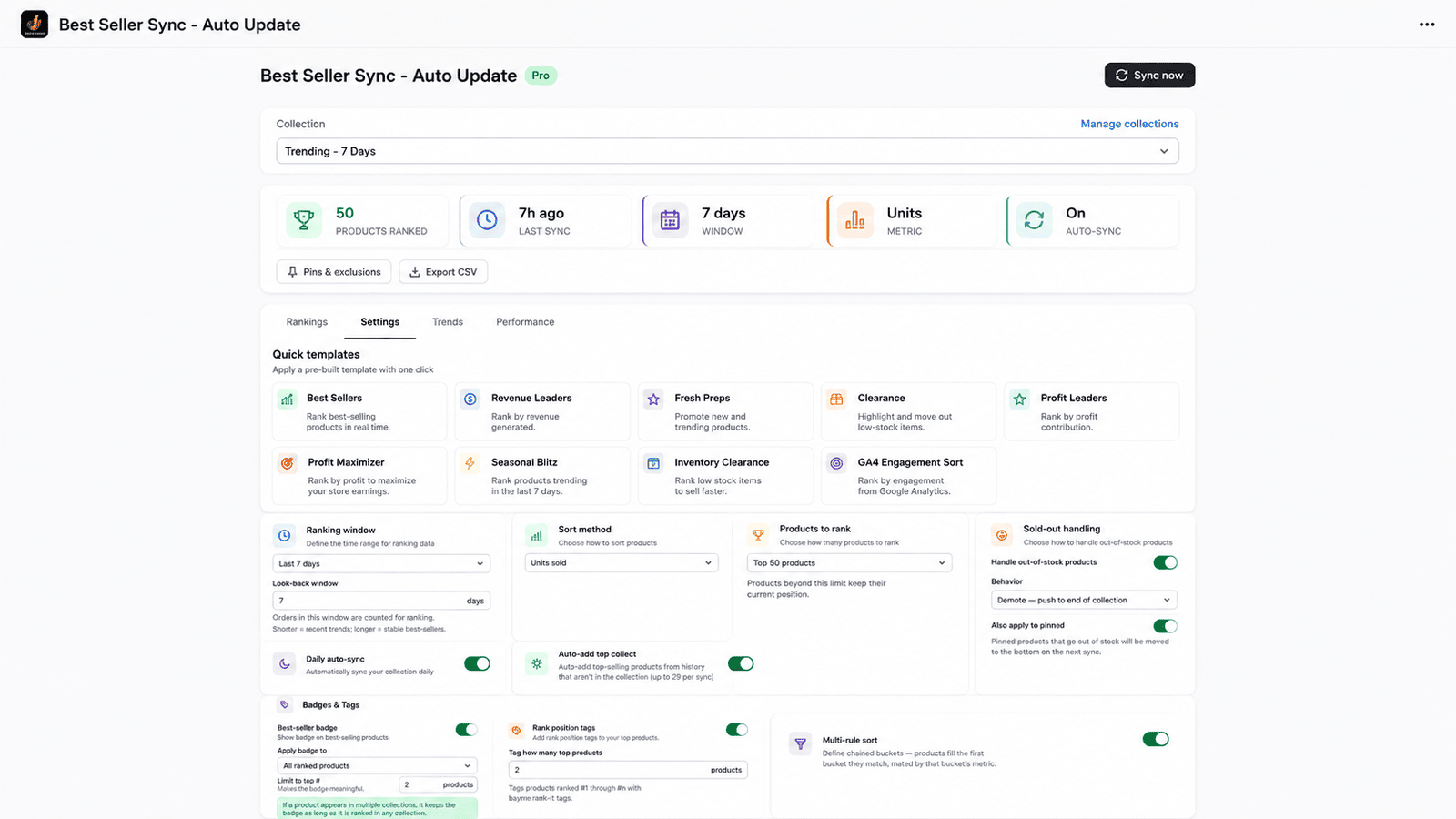
An automated merchandising strategy solves this problem by continuously placing your best-selling products where they deserve to be at the top of every collection.
Shopify App Store – https://apps.shopify.com/bestrank-sales-sorting
.
Why Collection Sorting Matters
Customers rarely browse every product in a collection.
Most purchasing decisions happen within the first few products they see.
If your top-performing products are hidden on page two or three because newer products were added, you’re losing potential revenue without realizing it.
Proper collection merchandising helps you:
- Increase conversion rates
- Improve average order value
- Highlight products customers already trust
- Reduce manual merchandising work
- Keep collections fresh automatically
Instead of spending hours rearranging collections, automation ensures your storefront always reflects real customer demand.
Sort Collections Using Real Performance Data
Rather than relying on manual decisions, collections can be ranked using actual business metrics.
Popular sorting methods include:
- Units sold
- Number of paid orders
- Total revenue generated
- Google Analytics 4 engagement metrics
- Combined multi-rule scoring
This ensures products that genuinely perform well stay visible.
For example:
A product selling 500 units should naturally appear above another that has sold only 20 units, regardless of when it was published.
Keep Best Sellers at the Top Automatically
Automatic synchronization means collections stay updated without manual intervention.
As new orders arrive, rankings update according to your selected rules.
This provides several benefits:
- No daily merchandising work
- Collections stay relevant
- Seasonal demand automatically reflects in rankings
- Better shopping experience
Whether you manage 50 products or 50,000, automation scales effortlessly.
Choose the Metric That Matches Your Business
Different businesses define “best seller” differently.
An effective merchandising solution should let you rank collections using multiple performance indicators.
By Units Sold
Ideal when you want to showcase the most popular products.
Perfect for:
- Fashion
- Beauty
- Accessories
- Consumer goods
By Revenue
Sometimes fewer sales generate significantly more revenue.
Sorting by revenue helps maximize profitability instead of simply highlighting volume.
By Orders
Order count identifies products consistently purchased across many customers.
This often represents trust and popularity.
By GA4 Engagement
Not every valuable product converts immediately.
Products with high engagement may deserve better visibility.
Using GA4 engagement metrics allows stores to surface products attracting significant customer interest.
Apply Multiple Sorting Rules
Real merchandising is rarely based on one metric alone.
Instead, stores often combine several conditions.
For example:
- Revenue first
- Orders second
- Inventory third
- Recently launched products boosted temporarily
Multi-rule sorting gives merchants complete control over collection organization.
Pin Important Products for Promotions
There are times when certain products must remain visible regardless of sales.
Examples include:
- New launches
- Holiday collections
- Brand partnerships
- Promotional campaigns
- High-margin products
Timed product pinning lets merchants keep selected products at the top for a specific duration.
Once the campaign ends, automatic sorting resumes.
No manual cleanup required.
Exclude Products from Automatic Sorting
Some products should never be reordered automatically.
Examples include:
- Gift cards
- Limited editions
- Subscription products
- Internal testing products
Exclusion lists ensure these products stay exactly where you want them.
Automatically Push Sold-Out Products Down
Few experiences frustrate shoppers more than clicking the first product only to discover it’s unavailable.
Automatic sold-out product management moves unavailable items lower in the collection while keeping in-stock products prominent.
Benefits include:
- Better customer experience
- Reduced bounce rate
- Higher conversion opportunities
- Cleaner collections
Grade Products by Performance
Not every product contributes equally to store revenue.
Performance grading helps categorize inventory into:
Grade A
Top-performing products that drive the majority of sales.
Grade B
Consistent performers with healthy demand.
Grade C
Low-performing products requiring attention or optimization.
This makes merchandising and inventory planning much easier.
Customize the Look-Back Window
Sales trends change over time.
A product that sold well last year may not be relevant today.
Instead of using lifetime sales, merchants can define custom analysis periods such as:
- Last 7 days
- Last 30 days
- Last 60 days
- Last 90 days
- Last 180 days
- Custom date range
This keeps rankings aligned with current buying behavior.
Show Best Seller & Rank Badges Without Coding
Social proof encourages purchasing.
Displaying badges like:
- Best Seller
- #1 Best Seller
- #2 Trending
- #3 Most Popular
helps customers identify popular products instantly.
Modern merchandising tools allow merchants to add these badges without editing Shopify theme files or writing code.
Multiple badge layouts also ensure they match your store’s branding.
Track Ranking Changes Over Time
Understanding how products move through rankings provides valuable merchandising insights.
Rank history helps merchants answer questions such as:
- Which products are gaining popularity?
- Which products are declining?
- How did a promotion affect rankings?
- Which collection performs best?
Historical snapshots make it easier to optimize future campaigns.
Export Collection Performance Reports
Merchants often need reports for:
- Marketing teams
- Inventory planning
- Product managers
- Executive reporting
CSV export allows easy sharing and deeper analysis using spreadsheets or BI tools.
Benefits of Automated Collection Merchandising
Businesses using automated collection sorting can experience:
- Better product visibility
- Higher conversion rates
- Increased average order value
- Less manual work
- Faster merchandising updates
- Improved customer experience
- Smarter inventory presentation
- Consistent storefront optimization
Automation ensures your collections evolve alongside customer buying behavior.
Who Should Use Automatic Best Seller Sorting?
This solution is ideal for:
- Fashion stores
- Electronics retailers
- Beauty brands
- Home décor stores
- Grocery businesses
- D2C brands
- Large Shopify Plus merchants
- Stores with multiple collections
- High-SKU catalogs
The more products your store has, the greater the impact automated merchandising can make.
In Summery
Your collection pages are one of the most important conversion points in your Shopify store.
If they’re still sorted manually or by publish date, your highest-performing products may be hidden from customers every day.
Automatically ranking collections by sales, revenue, paid orders, or customer engagement ensures shoppers always see your strongest products first. Features like timed pins, exclusion rules, sold-out product handling, product grading, rank tracking, storefront badges, and automated synchronization remove the manual effort from merchandising while improving the shopping experience.
Smarter collection sorting isn’t just about organization, it’s about helping customers discover the products they’re most likely to buy, resulting in higher conversions and better store performance.
If you are looking to build your own app for Shopify store – contact us
Frequently Asked Questions
1. How does automatic collection sorting work?
The app analyzes your selected performance metrics, such as sales, revenue, orders, or GA4 engagement, and updates product positions in your Shopify collections automatically.
2. Can I keep certain products at the top?
Yes. Timed product pinning allows you to prioritize specific products during promotions or campaigns while the rest of the collection updates automatically.
3. Does it push sold-out products down?
Yes. Out-of-stock products can automatically move lower in collections, ensuring customers see available products first.
4. Can I display bestseller badges?
Yes. Best Seller and ranking badges such as #1, #2, and #3 can be added to product cards without modifying your Shopify theme code.
5. Can I track ranking history?
Yes. Historical rank tracking lets you monitor product performance over time, compare changes, and export reports for further analysis.